

Managing multiple Revit files and their interconnected links has long been a time-consuming challenge for BIM professionals. Whether you’re preparing models for coordination reviews in Navisworks or updating project links across dozens of files, these repetitive tasks can consume hours of productive time every week. 

CBox Connect addresses these workflow bottlenecks with two powerful Revit plugins that automate what used to be manual, tedious processes. By enabling batch operations without opening individual files and streamlining link management, CBox Connect helps AEC teams reclaim valuable time while reducing the risk of human error in their BIM workflows. 

1. What is CBox Connect?

CBox Connect is a comprehensive Revit automation toolkit consisting of two specialized plugins designed to eliminate repetitive manual tasks in BIM workflows. These tools are built specifically for teams working with multiple Revit files, whether stored locally or on cloud platforms like Autodesk Construction Cloud (ACC) and BIM 360. 

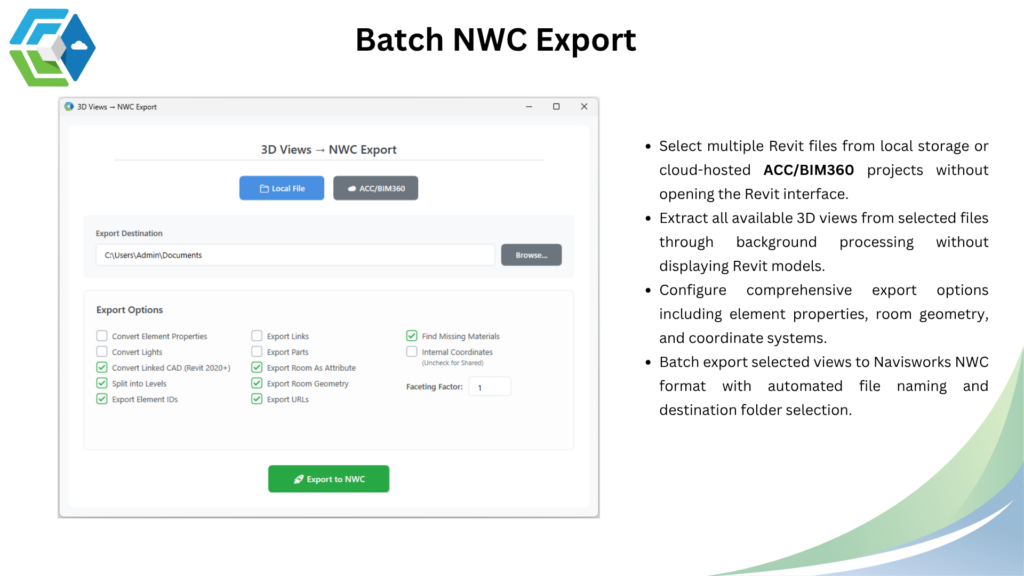
The first plugin, Batch NWC Export, transforms the way teams prepare models for coordination reviews by automating the export process to Navisworks format. Instead of opening each Revit file individually, extracting 3D views, and exporting them one by one, users can now process multiple files simultaneously through background operations. 

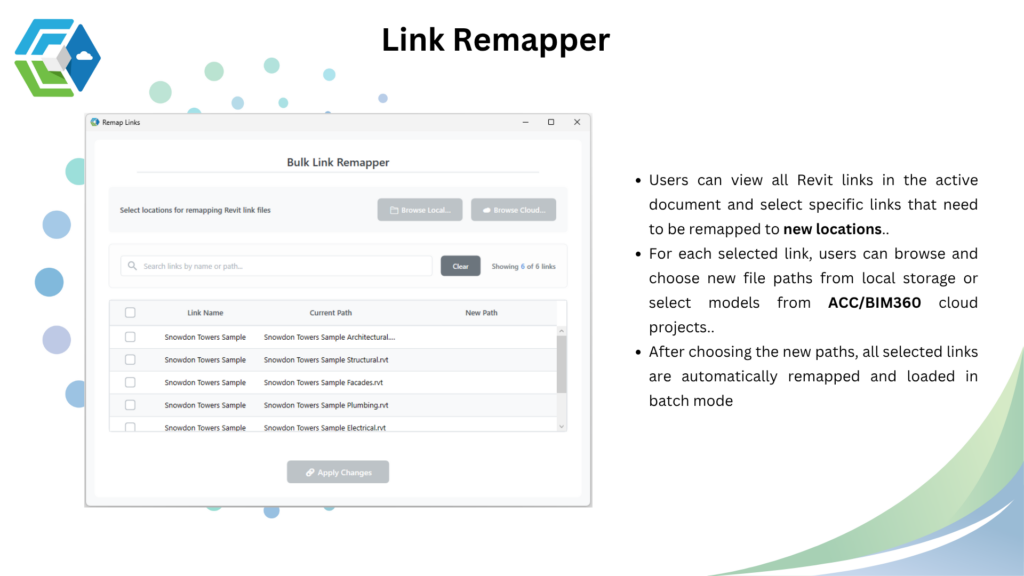
The second plugin, Link Remapper, solves the common headache of managing and updating Revit file links. When project file structures change, files are relocated, or cloud project paths are updated, this tool allows users to remap multiple links at once without the tedious process of reloading each link individually. 

Together, these plugins address two of the most time-consuming aspects of managing large-scale BIM projects, enabling teams to focus on design and coordination rather than file management. 

2. How CBox Connect Works?

2.1 Batch NWC Export

The Batch NWC Export plugin streamlines the process of converting Revit models to Navisworks format for coordination and clash detection workflows. 

Selection Process

Users start by selecting multiple Revit files from their workspace. The plugin supports both local file storage and cloud-hosted projects on ACC or BIM 360. This flexibility means teams can work seamlessly whether files are stored on local servers or in the cloud. 

Automated View Extraction

Once files are selected, the plugin automatically extracts all available 3D views from each file through background processing. This happens without opening the Revit interface, saving significant time and system resources. The plugin identifies every 3D view within each model, allowing users to choose which views to export. 

Export Configuration

Before exporting, users can configure comprehensive options to control what data gets included in the NWC files. Options include element properties, room geometry, and coordinate systems. These settings ensure that exported files contain exactly the information needed for downstream coordination tasks. 

Automated Export Process

After configuration, the plugin batch exports selected views to Navisworks NWC format. Files are automatically named according to user preferences and saved to designated destination folders. The entire process runs in the background, allowing users to continue with other work while exports complete. 

2.2 Link Remapper

The Link Remapper plugin simplifies the process of updating and managing Revit file links within active documents. 

Link Visibility and Selection

When users open the plugin, they see a complete list of all Revit links present in the active document. This provides immediate visibility into the model’s link structure. Users can then select specific links that need remapping rather than processing all links at once. 

Path Selection

For each selected link, users browse and choose new file paths. The plugin supports both local storage locations and cloud-hosted projects on ACC or BIM 360. This dual capability is crucial for teams transitioning between local and cloud workflows or working in hybrid environments. 

Batch Remapping

After new paths are chosen for all selected links, the plugin automatically remaps and loads all links in batch mode. This eliminates the need to remap each link individually through Revit’s standard interface, dramatically reducing the time required to update complex models with multiple links. 

3. Key Benefits

Time Savings

The most immediate benefit is time savings. Tasks that previously required hours of manual wornow complete in minutes. For projects with dozens of Revit files and multiple 3D views, the Batch NWC Export can reduce export time by 80% or more. Similarly, updating links across multiple models becomes exponentially faster. 

Reduced Human Error

Manual processes are prone to errors—forgetting to export a view, selecting wrong export settings, or mistyping a file path. CBox Connects automated approach eliminates these common mistakes by applying consistent settings across all batch operations and validating file paths before processing. 

Cloud Integration

Native support for ACC and BIM 360 means teams working in cloud environments don’t need to download files locally before processing them. This integration streamlines workflows for distributed teams and maintains the benefits of cloud-based collaboration. 

Background Processing

Running operations in the background without opening Revit files means better system performance and the ability to multitask. Users aren’t locked into watching progress bars while exports complete—they can continue working on active models or other tasks. 

Standardization

Batch operations ensure consistency across all processed files. Export settings, naming conventions, and coordinate systems remain uniform, which is essential for coordination workflows where consistency is critical. 

Scalability

Whether working on a small renovation project with a handful of models or a large infrastructure project with hundreds of linked files, CBox Connect scales to match project complexity without proportionally increasing the time investment. 

Why it matters: Small changes here can prevent costly overflows.

4. Common Use Cases

Weekly Coordination Meetings

Design teams preparing for coordination meetings typically need to export updated Navisworks models from multiple disciplines. Instead of asking each team member to export their files individually, a BIM coordinator can use Batch NWC Export to process all relevant models at once, ensuring everyone works with current data. 

Project Restructuring

When project folder structures are reorganized or files are migrated to cloud platforms, Link Remapper quickly updates all file references across the entire model set. This prevents the broken link errors that typically arise after major file relocations. 

Multi-Discipline Projects

Large projects with separate architectural, structural, and MEP models benefit from automated link management. As consultants update their file locations or naming conventions, the Link Remapper allows coordination teams to maintain proper links without manually searching for new file paths.

5.Why Choose CBox Connect ?

CBox Connect is purpose-built by BIM professionals who understand the daily challenges of managing complex Revit workflows. Unlike generic automation tools, these plugins address specific pain points that arise in real-world project delivery.

The dual functionality—export automation and link management—provides comprehensive workflow coverage in a single toolkit. Many teams find these two capabilities solve their most frequent time-consuming tasks. 

Cloud platform integration sets CBox Connect apart from tools that only support local file operations. As more firms adopt cloud-based BIM workflows, having native ACC and BIM 360 support becomes increasingly valuable. 

The plugin’s design prioritizes ease of use without sacrificing power. Advanced users can leverage comprehensive configuration options, while new users can achieve results with minimal setup. This balance makes CBox Connect accessible across different skill levels within a team. 

Regular updates and dedicated support ensure the plugin evolves with Revit and industry needs. As Autodesk introduces new features or cloud platform capabilities, CBox Connect adapts to maintain seamless compatibility. 

Conclusion

CBox Connect transforms time-consuming manual tasks into efficient automated workflows. By combining Batch NWC Export and Link Remapper capabilities, it addresses two of the most common workflow bottlenecks in BIM project delivery. The time savings alone justify adoption, but the added benefits of reduced errors, improved consistency, and better scalability make CBox Connect an essential tool for any team managing multiple Revit files. Whether working locally or in the cloud, these plugins streamline operations and free up valuable time for high-value design and coordination work. Ready to transform your Revit workflows? Discover how CBox Connect can help your team work smarter, not harder. 

Author

  • Suvir brings a unique blend of electrical engineering expertise and advanced BIM automation to the AEC industry. He specializes in Dynamo scripting, Revit Plugin Development, Autodesk Platform Services, and SolidWorks Automation to transform complex workflows into streamlined, intelligent solutions. His strength lies in merging core technical precision with cutting-edge automation, enabling multidisciplinary teams to achieve unprecedented efficiency. Suvir is at the forefront of integrating AI-driven methodologies into project delivery, pushing the boundaries of what's possible in digital construction. His dual expertise positions him as a catalyst for innovation in the evolving landscape of AEC technology.