- Inspire
- Innovate
- Integrate

- Home
- Case Studies
- Enhancing BIM Productivity with Automated Elevator Modeling in Revit
Enhancing BIM Productivity with Automated Elevator Modeling in Revit
Project Title
Custom revit automation plugin development for elevator modeling
Client
Renowned Elevator Company
Analysis By
Conserve Solutions
Scope
Revit Automation Implementation for Elevator Modeling and Documentation
Problem Statement
- Elevator modeling and documentation, as a critical part of vertical transportation systems in BIM projects, involve a high level of detail driven by complex shaft geometries, nested family structures, and multi-level coordination within the Autodesk Revit environment.
- These components must align precisely with architectural and structural elements while maintaining consistency in placement, clearances, and documentation standards across the entire BIM model.
- As BIM workflows evolve and model complexity increases, managing elevator systems across multiple views and levels becomes more demanding, requiring careful control over geometry, parametric relationships, and model behavior.
- Ensuring accuracy and consistency in elevator modeling in Revit becomes essential for maintaining reliable BIM documentation, especially when dealing with repeated configurations and continuously evolving design conditions.
Challenges and Objectives
- As the project progressed, elevator coordination became increasingly difficult due to the complexity of BIM workflows.
- Engineers were required to manage multiple elevator shafts across different levels, making placement and alignment time-consuming
- Documentation involved repeating the same tasks across multiple views, leading to inefficiencies
- Design revisions triggered rework across plans, sections, and dimensions
- Lack of a standardized process resulted in inconsistent outputs across teams
- Manual workflows increased the risk of errors in critical dimensions and clearances
- Core Challenge: Managing elevator modeling and documentation efficiently within a dynamic BIM environment
Our Solution

We developed a custom Revit automation plugin to streamline elevator workflows into a single, intelligent process.
The solution automates key tasks including:
- Extraction of shaft data directly from the BIM model
- Accurate placement of elevator models across levels
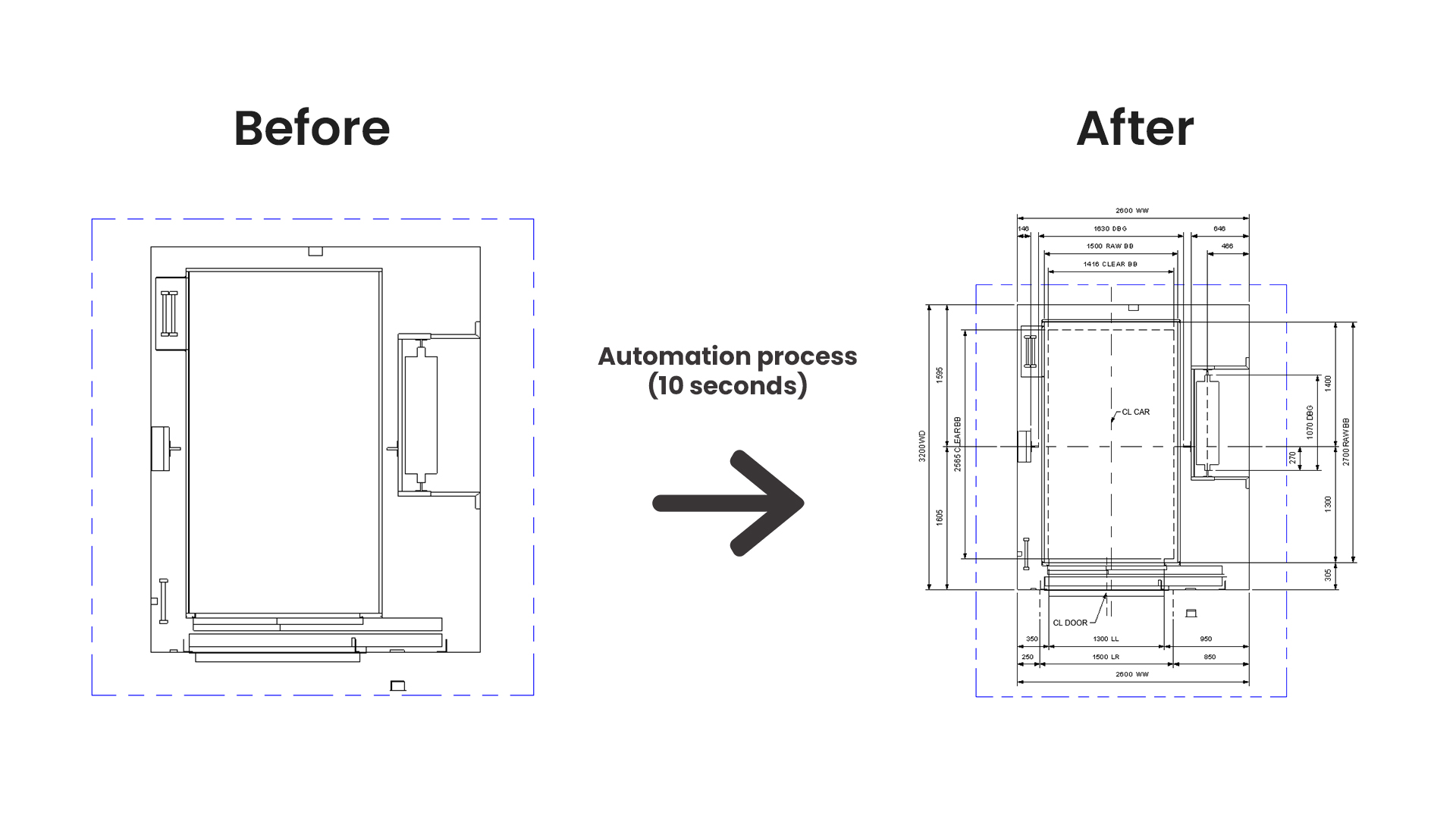
- Automatic generation of required views and layouts
- Intelligent dimensioning based on model geometry
Outcome: A fully integrated workflow that replaces multiple manual steps with a fast, reliable automation process
Before vs After Automation (High Impact Section)
Workflow Stage | Before Automation | After Automation | Impact |
Model Placement | Manual & error-prone | Automated & precise | High accuracy |
View Creation | Repetitive setup | Auto generated | 70% faster |
Dimensioning | Time-consuming | Fully automated | Reduce manual effort |
Revisions | Heavy rework | Instant updates | High efficiency |
Our Unique Approach (What Sets Us Apart)
Instead of treating this as just a modelling problem, we approached it as a workflow optimization challenge.
Process-First Thinking
We analyzed the complete elevator lifecycle—from shaft identification to final documentation—before writing a single line of code.
Deep BIM Intelligence
Our solution was not a generic automation tool. It was designed to understand:
- Shaft geometry
- Level relationships
- Parametric dependencies within the model
Our Differentiator:
We don’t just automate tasks—we engineer intelligent BIM workflows that think and adapt like a designer.
Benefits & Impact

Conclusion
- This solution transformed elevator modelling and documentation from a repetitive, manual process into a streamlined and automated workflow.
- By integrating automation into core BIM activities, the project achieved significant improvements in efficiency, accuracy, and delivery timelines.
- The result is scalable, which empowered BIM teams to focus on coordination and design, rather than manual drafting tasks.
- What makes us unique?
We don’t just deliver tools—we deliver smart BIM ecosystems that reduce effort, enforce standards, and scale with project complexity.

Quick Links
Copyrights © 2026. Conserve Solutions. All Rights Reserved.
BIM Data, Cost & Handover Services
BIM Coordination & Constructability
BIM Modelling & Digital Delivery
Discipline BIM Modeling (Architectural, Structural, MEP)
BIM Automation & Digital Engineering
BIM Data, Cost & Handover Services
Structural & Steel Detailing Services
Architectural Design, Visualization & Presentation Support
BIM Coordination & Constructability
BIM Modelling & Digital Delivery