- Inspire
- Innovate
- Integrate

- Home
- Case Studies
- Reducing BIM QA/QC Effort by 60% through Checklist-Based Automation in Revit
Reducing BIM QA/QC Effort by 60% through Checklist-Based Automation in Revit
Project Snapshot
Parameters | Details |
|---|---|
| Client | Gulf based Digital-Construction firm |
| Sector | AEC BIM project |
| Platform | Autodesk Revit |
| Service Partner | Conserve Solutions |
| Key Outcome | Improved project efficiency and reduced delivery risk by automating QA/QC processes, resulting in ~60% less rework and consistently high model validation accuracy. |
| Software and Technology Used | Autodesk Revit, C#, Revit API, Microsoft Excel (Reporting) |
Problem Statement
Our team spends excessive time manually checking Revit models before submission, yet we still face inconsistencies, missed errors, and lack of confidence in QA/QC outcomes.
Impact of Challenges
- Delivery Delays: QA/QC activities extended submission timelines by 18–25%
- Quality Issues: Rework cycles due to missed checks ranged between 20–28%
- Low Confidence in QA/QC: No measurable validation status; decisions based on assumptions
- Resource Dependency: ~35–45% of QA/QC effort depended on senior BIM coordinators
- Inconsistent Standards: Variations across teams caused 15–20% mismatch in deliverables
Conserve Solutions - How We Solved It
a. Thinking (Strategy)
We identified that the core issue was not just errors—but the absence of a structured, repeatable QA/QC framework within Revit.
Instead of improving manual checking, we focused on eliminating it through automation and standardization.
b. Execution (What We Built)
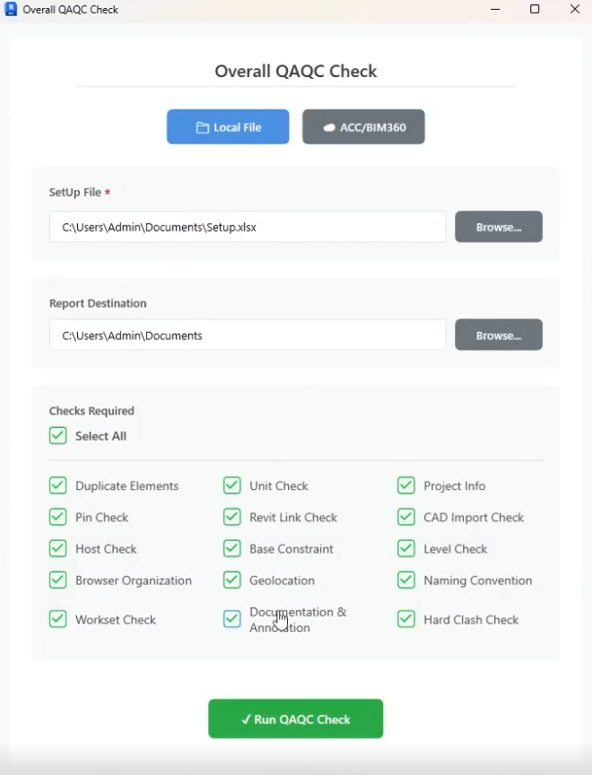
We developed a Checklist-Driven QA/QC Automation Tool integrated within Revit.
Key Capabilities:
- Predefined QA/QC categories: General | Quality | Setup
- Rule-based validation system
- Automated checks for:
- Naming conventions
- Project parameters & metadata
- Units and geolocation
- Worksets and pinned elements
- Linked models (Revit/CAD)
- Levels, hosting, constraints
- Annotation standards
- Clash-related conditions
Validation Output:
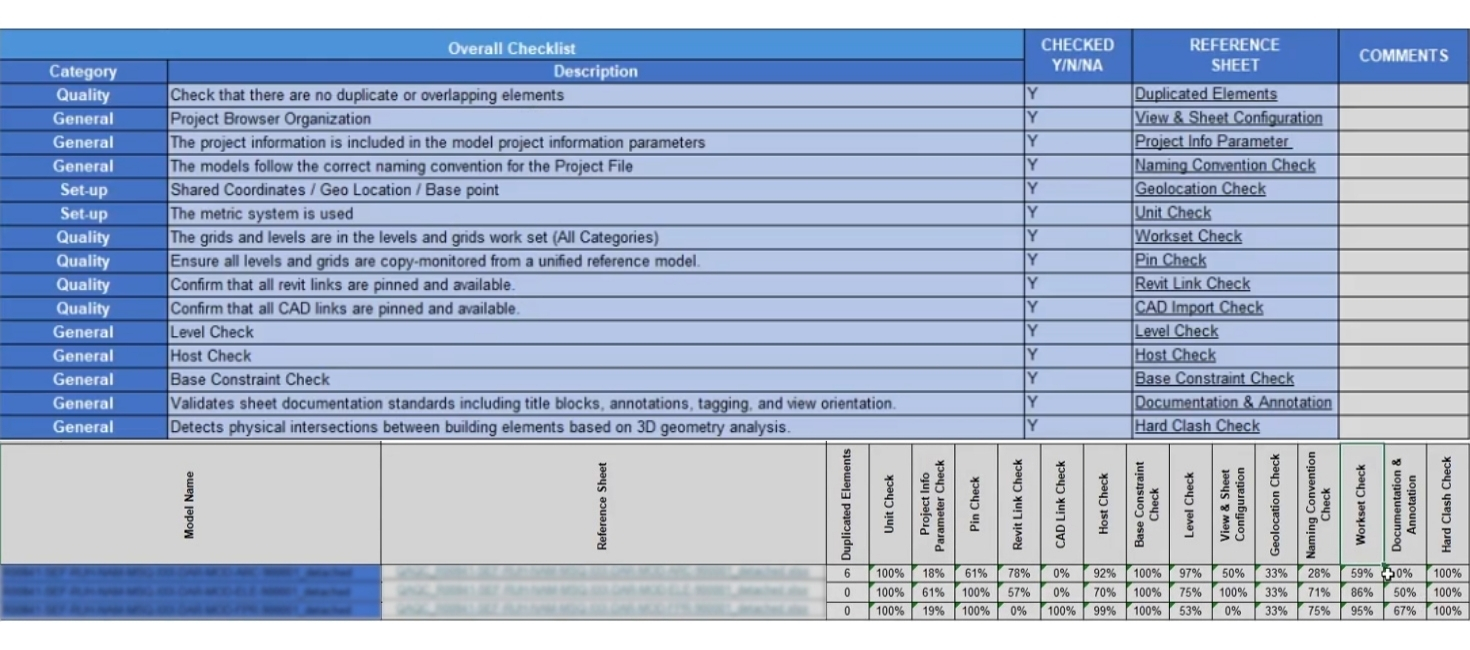
- Comprehensive consolidated report with compliance percentages across all checks.
- Detailed individual reports providing the necessary information to identify and rectify issues.
c. Integration (Impact Layer)
- Embedded directly into existing Revit workflows
- Applicable across multiple disciplines
- Batch processing capability for both local and cloud-based models.
- Enabled consistent QA/QC across teams and projects
- Provided audit-ready validation reports
The implementation enabled near-complete model validation coverage (>95%), ensuring that critical QA/QC checks are no longer missed and significantly reducing downstream coordination risks.
Project Timeline:
Phase | Duration/Details |
|---|---|
| Overall Duration | 4–5 Weeks |
| Week 1–2 | Requirement analysis & rule definition |
| Week 3–4 | Tool development & testing |
| Week 5 | Deployment & user training |
Delivered - What We Delivered
- Revit-Integrated QA/QC Automation Tool
- Standardized QA/QC checklist framework
- Centralized reporting system
- Documentation & user guidelines
- Training and implementation support
Before vs After - QA/QC
| Metric | Before | After |
|---|---|---|
| QA/QC Time per Model | 8–12 hours | 3–4 hours |
| Error Detection Accuracy | ~65–70% (manual) | ~90–95% (rule-based) |
| Rework Due to QA Issues | 20–28% | 5–8% |
| Process Consistency | Varies by user | Standardized across teams |
| Model Validation Coverage | Partial (~60%) | Near-complete (>95%) |
| Reporting & Audit Readiness | Not available | Automated & structured |
| Dependency on Senior Resources | High (~40%) | Reduced (~15–20%) |
Why Conserve Solutions
- Process-First Approach (Not just tool development)
- Strong focus on QA/QC integration within workflows
- Scalable solutions across disciplines and projects
- Ability to combine BIM expertise + automation intelligence
- Focus on client capability enhancement, not dependency
Client Outcome
“The QA/QC automation significantly reduced our manual effort and improved our confidence in model quality. We now have a clear, standardized validation process across all projects.”
– BIM Coordinator, AEC Project Team

Quick Links
Copyrights © 2026. Conserve Solutions. All Rights Reserved.
BIM Data, Cost & Handover Services
BIM Coordination & Constructability
BIM Modelling & Digital Delivery
Discipline BIM Modeling (Architectural, Structural, MEP)
BIM Automation & Digital Engineering
BIM Data, Cost & Handover Services
Structural & Steel Detailing Services
Architectural Design, Visualization & Presentation Support
BIM Coordination & Constructability
BIM Modelling & Digital Delivery