The terms are used interchangeably across the UK construction industry. Providers advertise “Scan to Revit” and “Scan to BIM” as if they mean the same thing. Some of them genuinely believe they do. They do not. And the gap between a Scan to Revit deliverable and a fully compliant Scan to BIM model under ISO 19650 is the gap between geometry and information — between a model your design team can view and a model your client can manage an asset with for the next 30 years. Projects that do not understand this distinction are accepting under-specified deliverables, discovering the shortfall at handover, and funding a second mobilisation to close it. This article clarifies exactly what each term means, where the difference matters, and how to make sure your UK project gets what it actually needs.
In this Blog:
Key Takeaways
Defining Scan to Revit and Scan to BIM
Where the Difference Becomes a Problem
How to Specify the Right Deliverable for Your Project
Conclusion
01 - Key Takeaways
Revit ≠ BIM by default
ISO 19650 requires information, not geometry
LOIN defines non-graphical content
EIR protects your handover model
BEP confirms provider capability
Stage 6 gap costs most
02 - Defining Scan to Revit and Scan to BIM
Both processes begin in the same place: a laser scan of an existing building, producing a registered point cloud. The divergence happens in what is done with that point cloud, and to what standard.
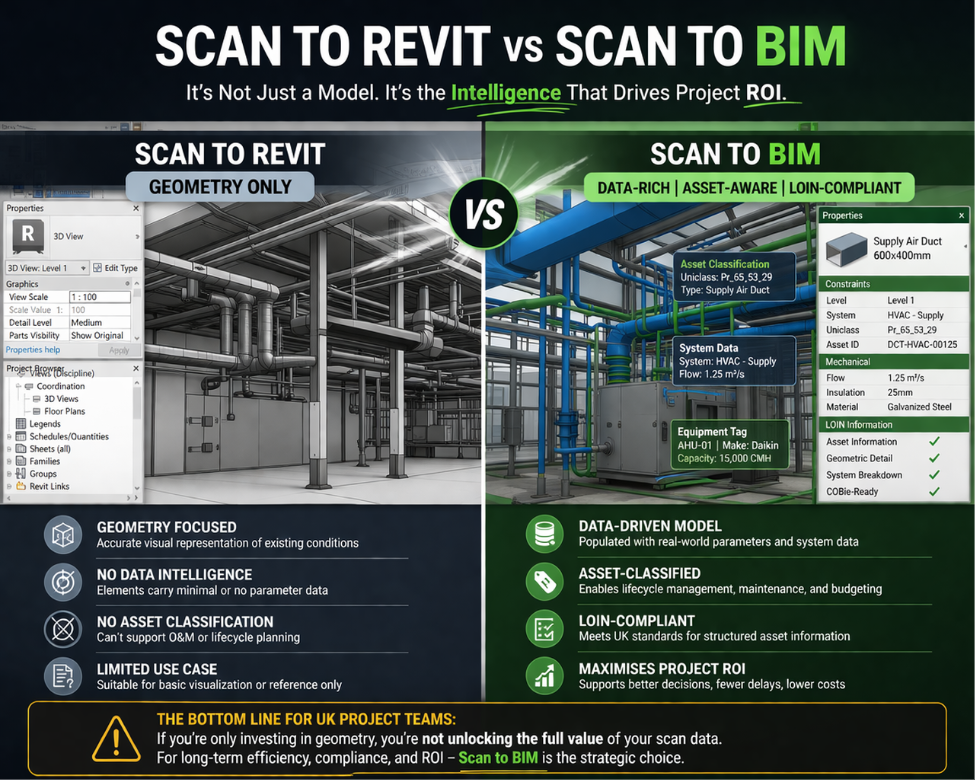
Scan to Revit: geometry first
Scan to Revit is the process of modelling a point cloud into Autodesk Revit – producing a three-dimensional representation of the existing building. The output is a .rvt file containing walls, floors, columns, beams, doors, windows, and MEP elements modelled to the surveyor2019s scope. What it does not necessarily contain is non-graphical information: asset type data, material specifications, element classifications, maintenance parameters, and the Level of Information Need (LOIN) defined in the project2019s Employer2019s Information Requirements (EIR).
Scan to BIM: information as well as geometry
Scan to BIM, correctly understood under BS EN ISO 19650, is a process that delivers not just geometric accuracy but defined information content – aligned to the RIBA Plan of Work stage being delivered, structured to meet the LOIN set out in the EIR, and issued through the Common Data Environment (CDE) to the appropriate information state. A Scan to BIM deliverable at RIBA Stage 6 for a facilities management handover contains far more than geometry. It contains the asset information your client’s FM team needs to manage, maintain, and operate the building – and it is structured in a way that integrates with asset management platforms.
The crucialfactor about Scan to BIM that every client should consider
Your competitor’s project is delivering a Scan to BIM model at RIBA Stage 6 that goes straight into their client’s FM system. Your project is delivering a Revit file with geometry and no asset data. At handover, your client asks for the information model. You discover the provider only ever understood the brief as Scan to Revit. The gap costs a second survey mobilisation, a modelling exercise, and a delayed handover. This is not a hypothetical. It happens on UK projects every year.
The coordination cost equation
Resolving a clash in the BIM model costs minutes. Resolving the same clash during installation costs multiples of the original coordination budget – and that does not include the knock-on programme impact to following trades.
03. Where the Difference Becomes a Problem
The distinction between Scan to Revit and Scan to BIM is not academic. It has direct consequences at three specific points in the project lifecycle.
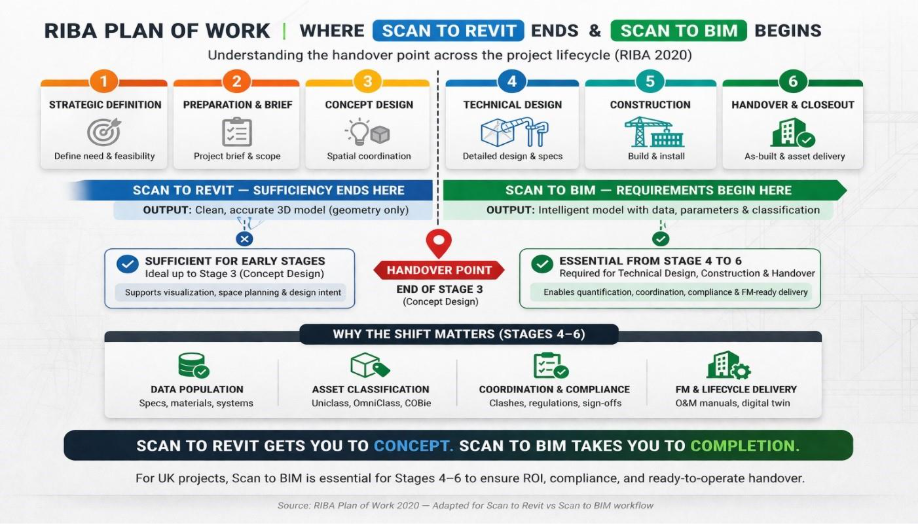
At RIBA Stage 4 - Technical Design
A Scan to Revit model may be adequate for early spatial planning. At Stage 4, structural engineers need accurate section properties, MEP designers need verified service routes, and quantity surveyors need element classifications. If the model was delivered as geometry without information content, the design team must enrich it themselves. That cost was not in the fee plan.
At RIBA Stage 5 - Construction
Contractors building from an under-specified Scan to Revit model encounter geometric conflicts, missing interface information, and progressively stop trusting the model. On refurbishment projects in London and Birmingham, where existing conditions are complex and tolerances are tight, this gap is particularly costly.
At RIBA Stage 6 - Handover and FM
This is where the difference is most consequential. Under ISO 19650, the handover model must meet the Asset Information Requirements (AIR) defined by the client – containing the asset data, operation and maintenance information, and classification structure needed for facilities management. A Scan to Revit model contains none of this by default. If the project brief specified “Scan to BIM” but the provider interpreted and delivered “Scan to Revit”, the handover model will fail the AIR check. The client is left with a geometry file, not an information model.
The clause that protects you
Before appointing any Scan to BIM provider, ensure the contract explicitly references the RIBA stage being delivered to, the Level of Information Need (LOIN) from your EIR, and the information states required in the CDE. A provider who cannot respond to these terms in their pre-contract BIM Execution Plan (BEP) is not delivering Scan to BIM – they are delivering Scan to Revit, regardless of what the invoice says.
04. How to Specify the Right Deliverable for Your UK Project
The solution is not to avoid Scan to Revit — it is entirely appropriate for early-stage design reference and spatial planning on projects that do not have a BIM information requirement. The solution is to know which one your project needs, specify it unambiguously, and appoint a provider who understands the difference.
When Scan to Revit is sufficient
If the model will be used for RIBA Stage 2 or Stage 3 spatial planning, pre-application design reference, or an internal design exercise with no formal EIR or ISO 19650 requirement, Scan to Revit is a cost-effective and appropriate deliverable. Specify the geometric accuracy tolerance, the elements to be modelled, and the Revit version. That is the scope.
When Scan to BIM is required
If the project has a formal EIR, operates under ISO 19650, requires RIBA Stage 4 technical design deliverables, or involves handover to a client FM team, the deliverable must be Scan to BIM – with LOIN defined by stage, non-graphical information requirements specified, CDE workflow agreed, and a pre-contract BEP produced by the appointed party confirming how those requirements will be met.
The three questions to ask every provider
Can you respond to our EIR and produce a pre-contract BEP confirming how you will meet the Level of Information Need at each RIBA stage?
How do you distinguish between graphical and non-graphical information requirements in your modelling scope?
Which CDE platform do you work on, and how do you manage information states for model exchange?
The right answer
A provider who delivers genuine Scan to BIM will answer all three questions without hesitation — and will have asked you for your EIR before you asked them. If they have not mentioned the EIR, LOIN, or RIBA stage by the second conversation, you are talking to a Scan to Revit provider, whatever their brochure says.
Conclusion
Scan to Revit and Scan to BIM are not interchangeable. One delivers geometry. The other delivers an information model that meets a defined Level of Information Need, is aligned to the RIBA Plan of Work, and is issued through a CDE to the information states required under ISO 19650. For UK projects with a formal EIR – and particularly for any project with a facilities management handover requirement – specifying Scan to Revit when you need Scan to BIM is a mistake that surfaces at the worst possible time: at Stage 6, when the client wants their asset information model and discovers they have received a geometry file.
Specify precisely what you need, reference your RIBA stage and LOIN requirements in the brief, and appoint a provider who demonstrates ISO 19650 fluency in their pre-contract BEP. The projects that do this reach handover without a second mobilisation.
Not Sure Whether Your Project Needs Scan to Revit or Scan to BIM?
An Emerging International Business Developer in the AEC Industry. Shankar is a Mechanical Engineer from India with a specialization in Mobility Engineering from the esteemed Politecnico di Milano University, Milan, Italy. Shankar is dedicated on exploring business opportunities in the Built Environment / BIM. He focuses on International Business Development Operations globally. He supports Team Conserve by Introducing New Client, Project Collaborations, Brand Awareness, New technology tool integrations and New Portfolio Creations.